


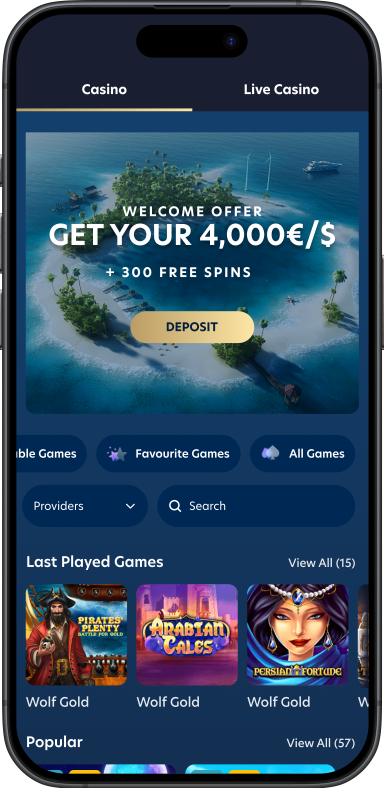

Lucky Dreams App: Quick Answers
| Question | Answer |
|---|---|
| In Apple's App Store? | No |
| In Google Play? | No |
| Is there an official APK? | No. Don't install APK files offered by other websites. |
| How do I get the app icon? | Use "Add to Home Screen" in Safari or Chrome |
| Does it open full-screen? | Yes. Lucky Dreams is set up as a web app, so the shortcut opens without the browser's address bar |
| Cost | Free |
| Storage used | Almost none: it's a shortcut, not installed software |
| Updates | Automatic every time you open it |
| Same account as desktop? | Yes: one login, the same balance, bonuses and loyalty progress |
How to Add the Lucky Dreams App to Your Home Screen
It takes less than a minute. Open Lucky Dreams in your phone's browser first, then follow the steps for your device. You can sign in before or after adding the shortcut; your session works the same either way.
iPhone and iPad (Safari)
- Open Lucky Dreams in Safari.
- Tap the Share button (the square with an arrow pointing up), at the bottom on iPhone or the top on iPad.
- Scroll down and choose Add to Home Screen.
- Keep the name "Lucky Dreams" or change it, then tap Add.
- Tap the new LD icon on your home screen whenever you want to play.
On recent iOS versions, Chrome and other browsers can also add a home screen shortcut from their share menu. If you can't see the option, update iOS and use Safari.
Android (Chrome)
- Open Lucky Dreams in Chrome.
- Tap the three-dot menu in the top-right corner.
- Choose Install app or Add to Home screen, depending on your phone.
- Confirm the name and tap Install or Add.
- Open Lucky Dreams from the icon on your home screen or in the app drawer.
Samsung Internet, Edge and Firefox have the same option in their menus, usually called "Add page to" or "Add to Home screen".
Browser, Home Screen App or APK?
There are three ways people try to play Lucky Dreams on a phone. Only two of them are official and safe.
| Feature | Mobile browser | Home screen app | Third-party APK |
|---|---|---|---|
| Official | Yes | Yes | No |
| Download or install file | None | None | Required |
| One-tap access | With a bookmark | Yes, from its own icon | Yes |
| Full-screen view | No, browser bars stay | Yes | Unknown |
| Always the latest version | Yes | Yes | Not guaranteed |
| Permissions requested | None | None | Often several |
| Security risk | Low | Low | High: may hide malware or a fake login screen |
Because Android allows apps from outside Google Play, unofficial websites sometimes offer a "Lucky Dreams APK". Lucky Dreams doesn't publish one, so any APK using its name was made by someone else. Installing it can give a stranger access to your phone and your login details. Stick to the browser or the home screen app.
What You Can Do in the Lucky Dreams App
Pokies
The full pokies lobby works on mobile, from Hold and Win games like Coin Strike: Hold and Win and Gold Gold Gold to book games such as Secret Book of Amun Ra and BGaming favourites like Lucky Lady Dreams. Modern pokies are built for touch, with the spin and stake buttons where your thumb sits, and many play in both portrait and landscape.
Live Casino and Table Games
Real dealers stream straight to your phone in the live casino, with roulette, blackjack, baccarat and game shows from Luckystreak, ICONIC21, Imaginelive, Religa and Live Vegas. Prefer to play at your own pace? The digital roulette, blackjack and baccarat tables run smoothly on mobile too. Live video needs a steadier connection than pokies, and the betting timer keeps running if your stream buffers.
Bonuses and Promotions
Every offer on the promotions page works the same on mobile: the welcome package of up to $10,000 plus 500 free spins, weekly deals such as Siren Mondays, Wavebreak Tuesdays and Happy Friday, and the cashback and level rewards of the loyalty program. Enter bonus codes in the cashier when you deposit. There's no separate mobile-only bonus, and the usual bonus terms apply on every device.
Tournaments and Jackpots
You can join slot tournaments, track the leaderboard and chase the Lucky Dreams jackpots from your phone, with the same prize pools as on desktop.
Deposits, Withdrawals and Verification
The full cashier works in the app, with AUD methods and crypto such as Bitcoin and Tether; see payment methods for limits and times. Withdrawals go through the same checks as on desktop, and verifying is often easier on a phone: snap a photo of each requested document and upload it in your account.
Support
The chat button is on every screen, and live chat is open 24/7, so you can sort out questions about games, bonuses or payments without leaving the app. More options are on the support page.
Tips for Smoother Mobile Play
- Keep your browser and phone updated. Games are built for current versions of iOS, Android, Safari and Chrome.
- Use Wi-Fi for live tables. Live streams use much more data than pokies.
- Close background apps that are streaming or downloading, especially on older phones.
- Unlock screen rotation if you prefer landscape; many games and live tables look better wide.
- Let your password manager sign you in. Save your Lucky Dreams password and log in with Face ID or a fingerprint instead of typing.
Fixing Common Mobile Problems
| Problem | What to try |
|---|---|
| "Add to Home Screen" is missing | On iPhone, use Safari and update iOS. On Android, open Chrome's three-dot menu and look for "Install app" or "Add to Home screen". |
| The icon has disappeared | Search your phone for "Lucky Dreams" or check the Android app drawer. If it was deleted, add it again. |
| Games load slowly | Switch to Wi-Fi, close background apps and reload. Clearing the browser cache can also help. |
| A game froze mid-round | Don't keep tapping. Reopen the game and check its history, or ask live chat to confirm the result. |
| The live stream keeps buffering | Move closer to your router or switch to a stronger connection. The round continues while you reconnect. |
| Logged out unexpectedly | Sessions can time out for security. Sign in again, and check that your browser isn't clearing cookies on exit. |
Avoiding Fake Lucky Dreams Apps
Because there's no store app, copycat sites and download pages sometimes use the Lucky Dreams name. Keep your account safe:
- Create the home screen shortcut only from the genuine Lucky Dreams site, never from a mirror or a download page.
- Check the padlock and address in the browser bar the first time you sign in.
- Never install an APK or "configuration profile" that claims to be the Lucky Dreams app.
- Lucky Dreams support will never ask for your password by email or chat.
- Use a password for Lucky Dreams that you don't use anywhere else.
Play Responsibly on Mobile
With the casino one tap away, it's easy to play more than you planned. Your phone can help: Screen Time on iPhone and Digital Wellbeing on Android can limit daily use of apps and websites, and gambling-blocking apps can block casino sites across your devices.

Lucky Dreams live chat can set a deposit limit, a break or self-exclusion on your account. If gambling is affecting you or someone close to you, Gambling Help Online offers free, confidential support 24/7 on 1800 858 858. See our responsible gaming page for more.